
Thoughts on Gemini 4 Neon
Testing and benchmarks
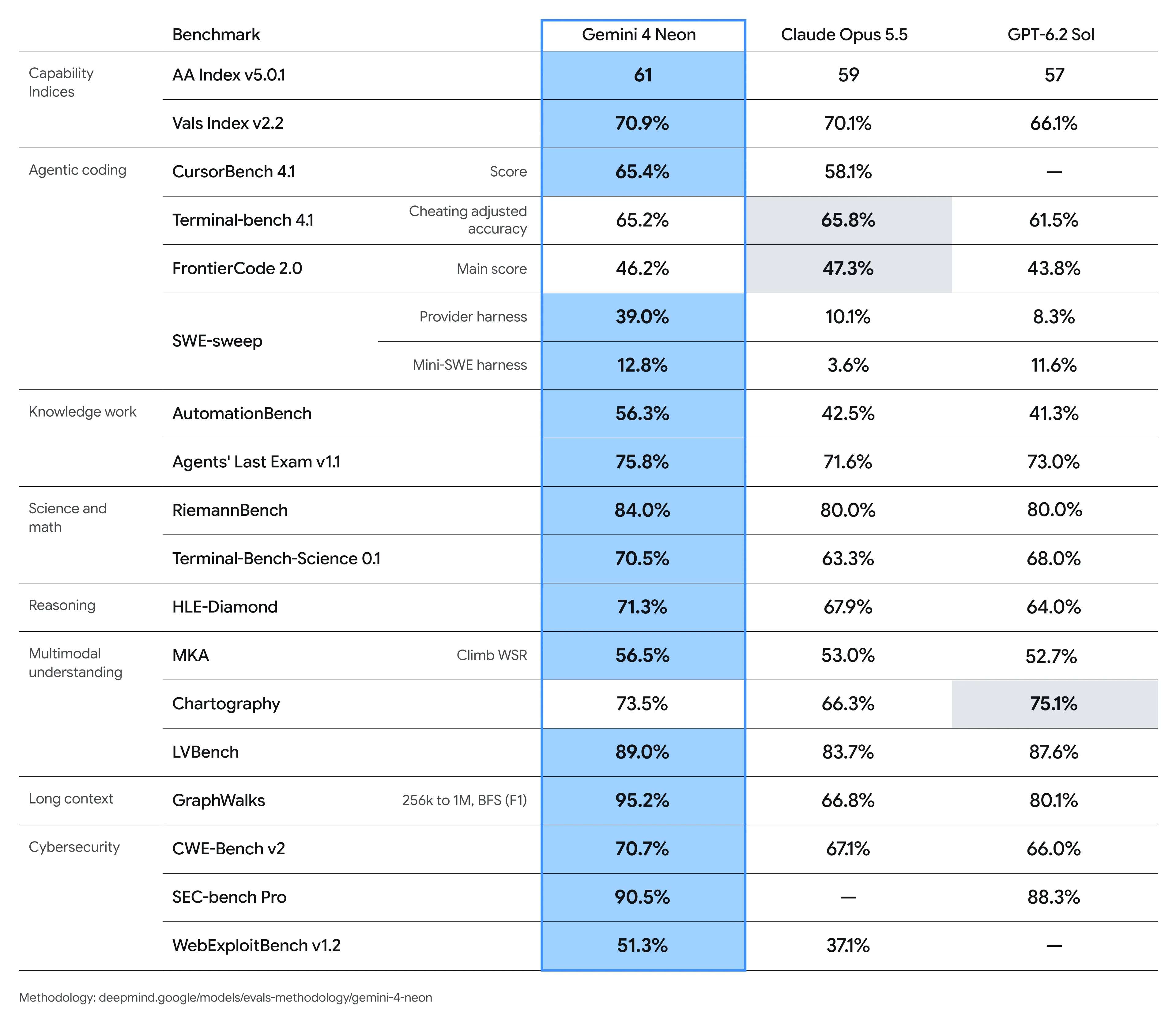
On benchmarks, Gemini 4 Neon absolutely crushes frontier coding and cybersecurity but the strongest use of it is by far in 3D and its multimodal input. Google has shown multiple experiments in 3D where Neon was a swarm orchestrator or did all the work in Blender through Python and understood each frame and texture.
Use cases and best things
As we know, this model is extremely impressive in 3D and Blender. Of course, one of its best use cases is creating 3D scenes, or basically inputting 3D elements into websites or videos, and, of course, creating hyper-realistic specified objects using Blender.
But I think there’s an even better use case, which is actually pretty underrated, and it’s where Gemini 4 Neon really, really stands out, right, because of its capabilities. That is motion design. If you actually give Gemini 4 Neon all the resources and all the references, it will be able to create a motion design video for you, right? Give it the reference of something you saw on the internet, and you ask it to research, be creative, and come up with something new. It’s going to actually do that and create your video.
Here’s the interesting part and why it actually beats so many other models: Gemini 4 Neon actually has multimodal input capability. That means that it natively processes multimodal inputs across text, images, audio, video, and documents within its unified 1 million context window. The model scores 89% on LV Bench, outperforming competing frontier models for temporal and visual comprehension. It can analyze stuff like visual pacing, audio, audiovisual synchronization, and dense visual layouts.
Now, that directly connects us to the second thing, which is actually really, really powerful when combined with motion design, and that is sound design. Rather than flattening audio into a text transcript, Neon ingests raw audio streams directly. This allows it to evaluate non-speech elements such as sound effects, music, tonal shifts, and vocal delivery. Its output is text only, but I think that that’s honestly fine for such an impressive model.
Neon or Opus?
I think this is the big question where people really are confused: which one do you actually use, Opus 5.5 or Gemini 4 Neon? It depends on what you’re specifically doing.
For me, I think that Opus is the all-rounder model for research tasks and understanding references. I think right now it is the best model in the world at understanding references. Maybe it even beats Neon at those because of its really clear understanding of your references and your inputs. I also think that it’s really, really good at UI and UX when you direct it perfectly.
Now, when it comes to 3D, that’s where Neon closes the gap because I think Opus sometimes still has issues with clipping, lighting, and shadows to depict the model. That is only for very, very complex, massive models, unless you actually direct it perfectly. This happens with every model, but of course, as we move on and new models come around, this is going to get fixed.
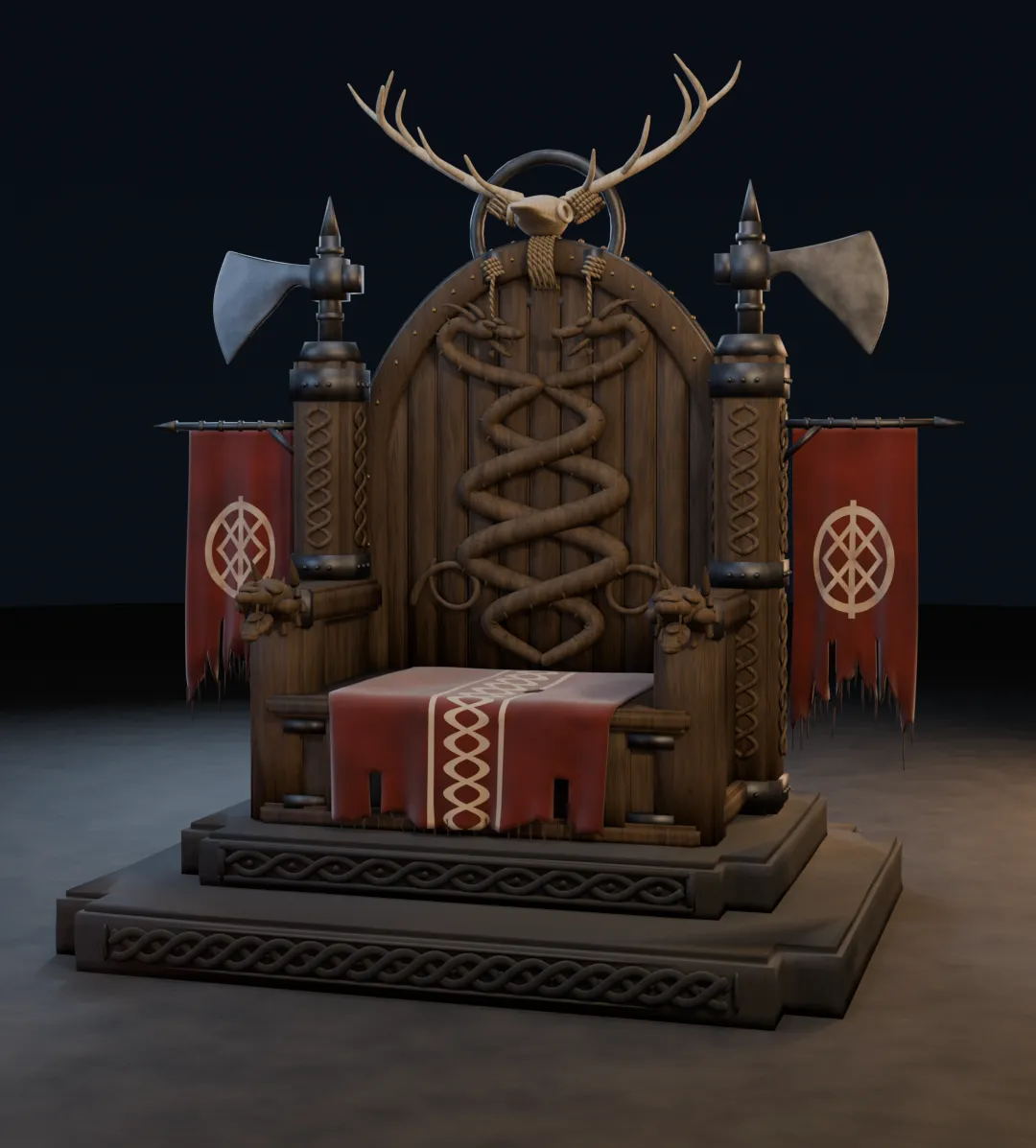
With Neon, I expected parts to overlap or clip. They never did, not once across the throne.
Now, when it comes to knowledge, then Opus 5.5 definitely holds the freshest knowledge cutoff, which is June 2026.
So, which one do you choose? Well, it depends on whether you’re a researcher, design engineer, developer, or you want to just test these out for your business or team.
I think that for a team, a Claude subscription is the best price because it offers you the best world-class models, especially if you will be willing to invest in the higher category, like Fable 5.2, the top-level models that are actually very expensive yet impressive.
Talking about expense, Neon is actually significantly cheaper than Opus 5.5. That can be a really good thing because its outputs are remarkably similar.
Now, if you’re into design engineering or researching, you should definitely go for Opus because it’s really good at understanding references, as I’ve said before. It’s a great design engineer with the right direction pointed to it. I think that you should really tell Opus your precise idea instead of just asking it to complete one single concept. That’s when everything breaks. You need to have a clear goal, and you need to learn how to have a clear idea for your project so everything works out nice for you.
Now, on the other end, if you’re a coder, a 3D designer, or someone who likes to make videos or is trying to get the best out of their subscription, then you should go for the Google AI Pro subscription, which also gives you many more things. The best part is that Google Antigravity also gives you access to other frontier models. That’s something I really, really appreciate because it gives you access to models like Argon, Hydrogen, Opus, Sonnet.
It also is pretty good and has a wide range of features and customization, so you can also talk to your agent as it’s built. That’s a specific voice mode.
In conclusion, I think that Google has really stepped up its quality of frontier models, and now they’re really competing with Claude and GPT models. Let’s wait and see until the next releases of Claude and GPT come around to see how the labs adapt to the race.